Email Setup
Desktop
Thundebird
Outlook
Mobile
Iphone
Android
AI Features
AI Customer Service
AI Positioning
AI Product Tools
AI Suggestion
AI Handbook
AI Page Editor
AI-assisted Content Engine (A.C.E)
AI Profile & AI Prompt Refine
Global AI Content Generator
AI Service Tools
AI FAQ
AI Brochures PDF
Website Management
Login NEWPAGES Merchant System (NMS)
NMS Switch Language
Dashboard
Manage Products
Manage Service
Manage Photoalbum
Manage News / Promotion
Manage Ratings & Reviews
Manage Google Reviews
NMS Merchant App
Profile Setting
Support
Update Form
Report
NP Merchant Points
NMS Credit
Manage YouTube
Manage Career
Manage Download
Website Setting
Account Setting
Content Generator
Manage Others (Gallery)
Manage Testimonials
SEO Guide
On-page Optimization
e-Commerce (My Sales)
Dashboard
Order Management
Invoice
Shipping
Delivery List
Packaging & Picklist
Self Pick Up Setting
Shipping Setting
No available shipping method
Easyparcel
Lalamove
Tracking.my
Members
Marketing Tools
Voucher
Birthday Campaign
Discount Campaign
Add-on Deals
Mix & Match
Purchase Link
Broadcast Management
Product Sold & Customer Report
Ecommerce Mail Setting
Popup & Social Proof
Checkout Cart Setting
Website Header Setting
Additonal Charges Setting
Notification Setting
e-Commerce Process (Add to Cart Flow)
Plugins
Activate Plugin
Marketplace Synchronization
Tiktok Sync
Lazada Sync
Shopee Sync
Affiliate Marketing & Referral
Membership & Loyalty Program
Checkout & Payment Link
Quotation Pro
Sales Landing Page
Whatsapp Cart & Chat
Product Comparison
Social Media Synchronization
Facebook My Chatbot
Booking System
BusinessTag
E-Invoice Customer Profile
Warranty System
PDF Encryptor
Background Removal
Mantap
FREE MANTAP
NEWPAGES Official API
NEWPAGES Apps Management
CRM System
Spam Expert - Domain Level
Dashboard
Incoming
Logs
Delivery Issue Log
Spam Quarantine
Domain Statistics
Train Messages
Incoming - Protection Settings
Recipient Allow List
Recipient Block List
Sender Allow List
Sender Block List
Allow List Filtering Rules
Block List Filtering Rules
Customise Actions
Filter Settings
Attachments Restrictions
Email Size Restrictions
Continuity
Delivery Queue - Incoming
Compose Email
My Settings
Domain
Webmail
Setup Signature
Delete Email
Adjust Spam Score
Set Autoresponders In Webmail
Reset Password
Admin Email System
Knowledge Tips
Email Issues
Demonstration
Progressive Web App Ready (PWA)
Select Categories
Email Setup
Desktop
Thundebird
Outlook
Mobile
Iphone
Android
AI Features
AI Customer Service
AI Positioning
AI Product Tools
AI Suggestion
AI Handbook
AI Page Editor
AI-assisted Content Engine (A.C.E)
AI Profile & AI Prompt Refine
Global AI Content Generator
AI Service Tools
AI FAQ
AI Brochures PDF
Website Management
Login NEWPAGES Merchant System (NMS)
NMS Switch Language
Dashboard
Manage Products
Manage Service
Manage Photoalbum
Manage News / Promotion
Manage Ratings & Reviews
Manage Google Reviews
NMS Merchant App
Profile Setting
Support
Update Form
Report
NP Merchant Points
NMS Credit
Manage YouTube
Manage Career
Manage Download
Website Setting
Account Setting
Content Generator
Manage Others (Gallery)
Manage Testimonials
SEO Guide
On-page Optimization
e-Commerce (My Sales)
Dashboard
Order Management
Invoice
Shipping
Delivery List
Packaging & Picklist
Self Pick Up Setting
Shipping Setting
No available shipping method
Easyparcel
Lalamove
Tracking.my
Members
Marketing Tools
Voucher
Birthday Campaign
Discount Campaign
Add-on Deals
Mix & Match
Purchase Link
Broadcast Management
Product Sold & Customer Report
Ecommerce Mail Setting
Popup & Social Proof
Checkout Cart Setting
Website Header Setting
Additonal Charges Setting
Notification Setting
e-Commerce Process (Add to Cart Flow)
Plugins
Activate Plugin
Marketplace Synchronization
Tiktok Sync
Lazada Sync
Shopee Sync
Affiliate Marketing & Referral
Membership & Loyalty Program
Checkout & Payment Link
Quotation Pro
Sales Landing Page
Whatsapp Cart & Chat
Product Comparison
Social Media Synchronization
Facebook My Chatbot
Booking System
BusinessTag
E-Invoice Customer Profile
Warranty System
PDF Encryptor
Background Removal
Mantap
FREE MANTAP
NEWPAGES Official API
NEWPAGES Apps Management
CRM System
Spam Expert - Domain Level
Dashboard
Incoming
Logs
Delivery Issue Log
Spam Quarantine
Domain Statistics
Train Messages
Incoming - Protection Settings
Recipient Allow List
Recipient Block List
Sender Allow List
Sender Block List
Allow List Filtering Rules
Block List Filtering Rules
Customise Actions
Filter Settings
Attachments Restrictions
Email Size Restrictions
Continuity
Delivery Queue - Incoming
Compose Email
My Settings
Domain
Webmail
Setup Signature
Delete Email
Adjust Spam Score
Set Autoresponders In Webmail
Reset Password
Admin Email System
Knowledge Tips
Email Issues
Demonstration
Progressive Web App Ready (PWA)
AI-assisted Content Engine (A.C.E)
July 13, 2026What is AI-assisted Content Engine (A.C.E)
AI-assisted Content Engine (A.C.E) helps you scan, plan, and publish fresh articles on your site every week so you don't have to spend countless hours writing.
How it works?

Currently, AI-assisted Content Engine (A.C.E) only applicable to selected package. Refer to your Account Manager for package eligibility
Where to find A.C.E

Log in to NMS. Then on the Dashboard Menu, look for ACE
Setting Up A.C.E

Choose your publishing mode:
Full Autopilot - Ai helps to draft, schedule, and publish content automatically.
Needs Approval - Needs your approval before each piece goes online.
Full Autopilot - Ai helps to draft, schedule, and publish content automatically.
Needs Approval - Needs your approval before each piece goes online.

Pick your favourite visual style for Ai to generate a featured image for your content.
You can set the style, mood, color, and lighting.
If you have a preferred style, click on "Match my image" to upload your preferred visual.
You can set the style, mood, color, and lighting.
If you have a preferred style, click on "Match my image" to upload your preferred visual.

Add your logo to every cover image.
You can set the logo size, transparency, and preferred corner.
You can set the logo size, transparency, and preferred corner.

You can set your AI Profile or fine-tune the 6 inputs to better match your brand.
Click here to learn how to set your AI Profile
Click here to learn how to set your AI Profile

Remember to save your ACE settings
Setting Up Your Plan


Choose your plan duration between 7 days or 14 days

Choose your content mode:
Create - Focus on publishing new blog posts, news updates, and product descriptions to grow your content surface.
Balanced - Mix of new content creation and optimising existing pages — broad coverage with steady improvement.
Optimize - Focus on refreshing and improving existing content to boost quality scores and SEO rankings.
Create - Focus on publishing new blog posts, news updates, and product descriptions to grow your content surface.
Balanced - Mix of new content creation and optimising existing pages — broad coverage with steady improvement.
Optimize - Focus on refreshing and improving existing content to boost quality scores and SEO rankings.

Once you have selected your preferred content mode, click Build My Calendar to start generating your articles.
Ai might require some time to generate the content.
Ai might require some time to generate the content.
Publishing Your Articles

If you have selected Full Autopilot as your preferred publishing mode in the ACE settings, your articles will be automatically approved and published based on the scheduled date.
On the other hand, if you have selected Needs Approval as your preferred publishing mode, every article will require your approval before it is published online.
You can hide, reject, or edit by clicking the article.
On the other hand, if you have selected Needs Approval as your preferred publishing mode, every article will require your approval before it is published online.
You can hide, reject, or edit by clicking the article.
Editing Your Articles

You can change the article's image by clicking on "Regenerate Image".
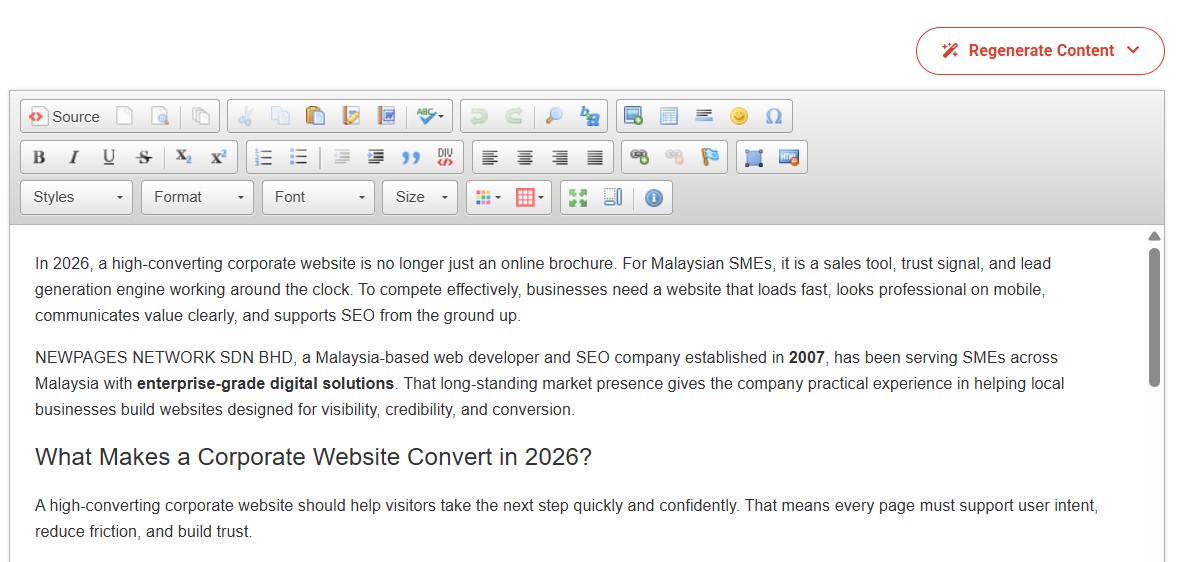
You can change the article's content by clicking on "Regenerate Content".
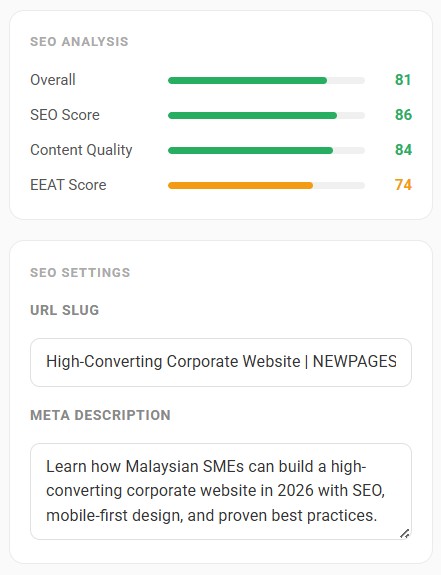
You can use the Ai-generated custom URL (a.k.a URL slug) and meta description for your article or manually change it by yourself.

Once done, click "Approve for Publish," and your article will be published online as scheduled.